How to manage your Christmas gift budget and ideas using Google Sheets

Copy our free Google Sheets gift tracker: who you’re buying for, budget per person, what you’ve spent and what’s left. Plus a rolling gift ideas list.
Updated October 2026.
Summary: Gift budgets slip when ideas, prices and purchases live in different places, because you can’t see a running total. Good ideas slip the same way, because the moment someone mentions the thing they want is usually months before you’re shopping. One Google Sheet fixes both. An ideas tab stays open all year and collects what you hear, then in November you build this year’s list from it, with a row per gift, a budget per person, and formulas that show your total budget, what you’ve spent and what’s left. Keep the file and you also have a record of what you’ve given people before.
Every year I reboot the same Christmas list file, add a tab for this year, and start filling in who I’m buying for and what I’m thinking of getting them. The part that’s changed since I first shared the template is where the ideas come from. They used to arrive in November, under pressure, which is how you end up buying a candle. Now there’s a tab that stays open the other eleven months, and November is mostly copying rows across.
The template is free to copy, and the rest of this article walks through how I use it.
The ideas tab stays open all year
The ideas tab has four columns: who it’s for, the idea, where you saw it, and the date you added it. There’s no cost, no status and no budget, because at the point of capture you don’t know any of that and trying to fill it in is what stops you writing the idea down at all.
The habit is the whole thing. Someone says “I keep meaning to get one of those” in March, you open the Sheets app on your phone and type a row. The tab is also where birthday ideas go, because the question of what to get someone comes up more than once a year and the answer is the same list.
ACTIVITY: Add an ‘Ideas’ tab to your file with those four headings, then write down the one gift idea you’ve been carrying around in your head. If there isn’t one, write down the last thing someone in your family said they wanted.
Build this year’s list from the ideas tab
In November, open the ideas tab and copy the rows you’re going to act on into this year’s tab. Each one becomes a gift row with a budget and a status of ‘Unpurchased’. Ideas you skip stay where they are for next year, which is the point of not deleting anything.
Starting from a list you’ve been feeding all year changes how November feels. You’re choosing between ideas instead of hunting for them, and the people who are hard to buy for already have three options waiting.
Use one row per gift
Each gift gets one row with six columns: who it’s for, supplier, item, cost/budget, purchased and notes. The supplier column saves you searching for where you saw something. Use notes for sizes, colours, and ‘check if they already have this’.
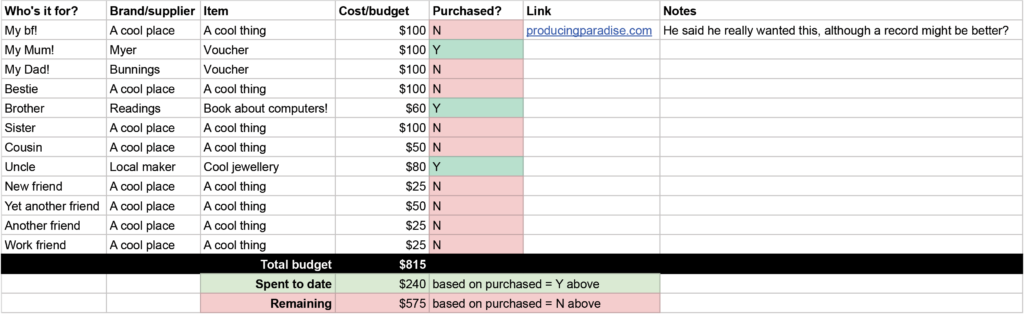
Example Christmas gift list
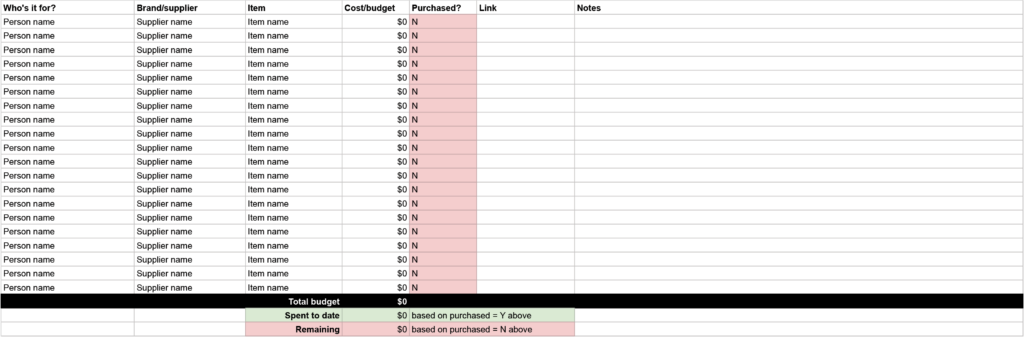
ACTIVITY: If you’re not a Google native, use a blank sheet of paper with these six headings and fill in the first gift you have in mind.
| Who it's for | Supplier | Item | Cost/budget | Purchased | Notes |
|---|---|---|---|---|---|
| Your person | Your shop | Your idea | Your amount | Unpurchased | Your notes |
Set each person’s budget first
Add everyone you’re buying for, set every row to ‘Unpurchased’, and give each person a budget. With the numbers on the page, you can catch an expensive idea while it’s still easy to change. A 50-dollar idea looks different when the budget for that person is 30.
Let colour and formulas track your spending
Conditional formatting colours each row by status, so you can see what’s still to buy. Three formulas then give you your total present budget, the amount spent to date and the cost remaining.
A SUMIF formula adds up only the rows marked ‘Purchased’. If your cost/budget column is D and your purchased column is E, it looks like this:
=SUMIF(E:E,"Purchased",D:D)Change the column letters to match your sheet. Subtract the result from your total budget to get what’s left.
ACTIVITY: Above your list, add three cells labelled ‘Total budget’, ‘Spent to date’ and ‘Remaining’. Put your overall budget in the first, the SUMIF formula in the second, and the first minus the second in the third. Then add a conditional formatting rule to the purchased column that changes the row colour when it says ‘Purchased’.
Update the sheet when you buy
When you buy something, change its status to ‘Purchased’ and enter what you paid. The row colour changes and the spent and remaining numbers update.
If someone new joins your list, add them with a budget and every gift set to ‘Unpurchased’.
This year’s tab is next year’s record
Every year’s tab stays in the file. Before I decide what to buy someone, I look at what I gave them before, and whether an idea I skipped last year still holds up. The ideas tab and the old tabs are the same file doing two jobs, one looking forward and one looking back.
The video walkthrough
Here's the video (9min), where I run through the list setup and how to use it:
Here's what's covered:
0:25 Setting up the spreadsheet
0:36 Suggested fields: who it's for, supplier, item, cost/budget, purchased, link and notes
1:00 Demo present entry
1:38 Adding the people you want to buy presents for
2:10 Setting all as 'unpurchased' to begin with
2:23 Allocating a budget for each person
3:15 Using conditional formatting to highlight purchased vs unpurchased
3:36 Calculating the total present budget, amount spent to date and cost remaining
5:10 How to update as you buy things
5:47 How to add a new person to the list
7:35 When to use
8:00 Benefits of a repeating list: seeing what you've bought for people before!
Make your own copy via the 'Present list spreadsheet' link, and check out our other free templates too.
FAQ
How do I get the template?
Open the 'Present list spreadsheet' link. It copies to your Google account as a private file, so you can change it however you like and the original stays untouched.
Do I start a new file every year?
I add a new tab to the same file. That keeps previous years’ lists in one place, so you can look back at what you gave people.
Where do ideas go the rest of the year?
On the ideas tab. Add a row whenever someone mentions something, with who it’s for and where you saw it, and don’t worry about price or status until November.
What should I put in the notes column?
Anything you’d otherwise try to remember: sizes, colours, whether someone already owns something similar, or when a sale ends.
Christmas list sorted? Now the rest of your year
A list where every gift has one place and one status cuts down what you have to remember. The ebook applies that idea to the rest of your week.
Want to see how that works beyond Christmas?
The Most Organised Person I Know shows you how to design simple systems that reduce mental load, from daily tasks through to long-term projects.
GET THE EBOOK →
Build systems that help you achieve financial clarity and business success.